
Are you looking for a full social CRM? Check out GroupTrack!
Message Folders and GroupTrack work side-by-side, one for quick and simple organization, the other for tracking your entire sales process across social!
Chrome Extension for Power Communicators

Organize Your Direct Messages with Custom Folders

Stop losing high-value conversations in a messy DM feed. Tag, triage, and organize your chats across Facebook, Instagram, LinkedIn, and Skool — including dedicated Facebook Marketplace folders.

Free plan available Up to 3 folders on 1 platform No credit card required to start
Works smoothly on your favorite messaging web apps
Facebook Messenger
Facebook Marketplace (Special Support)
Instagram Direct
LinkedIn Messaging
Skool Chats

See Message Folders In Action

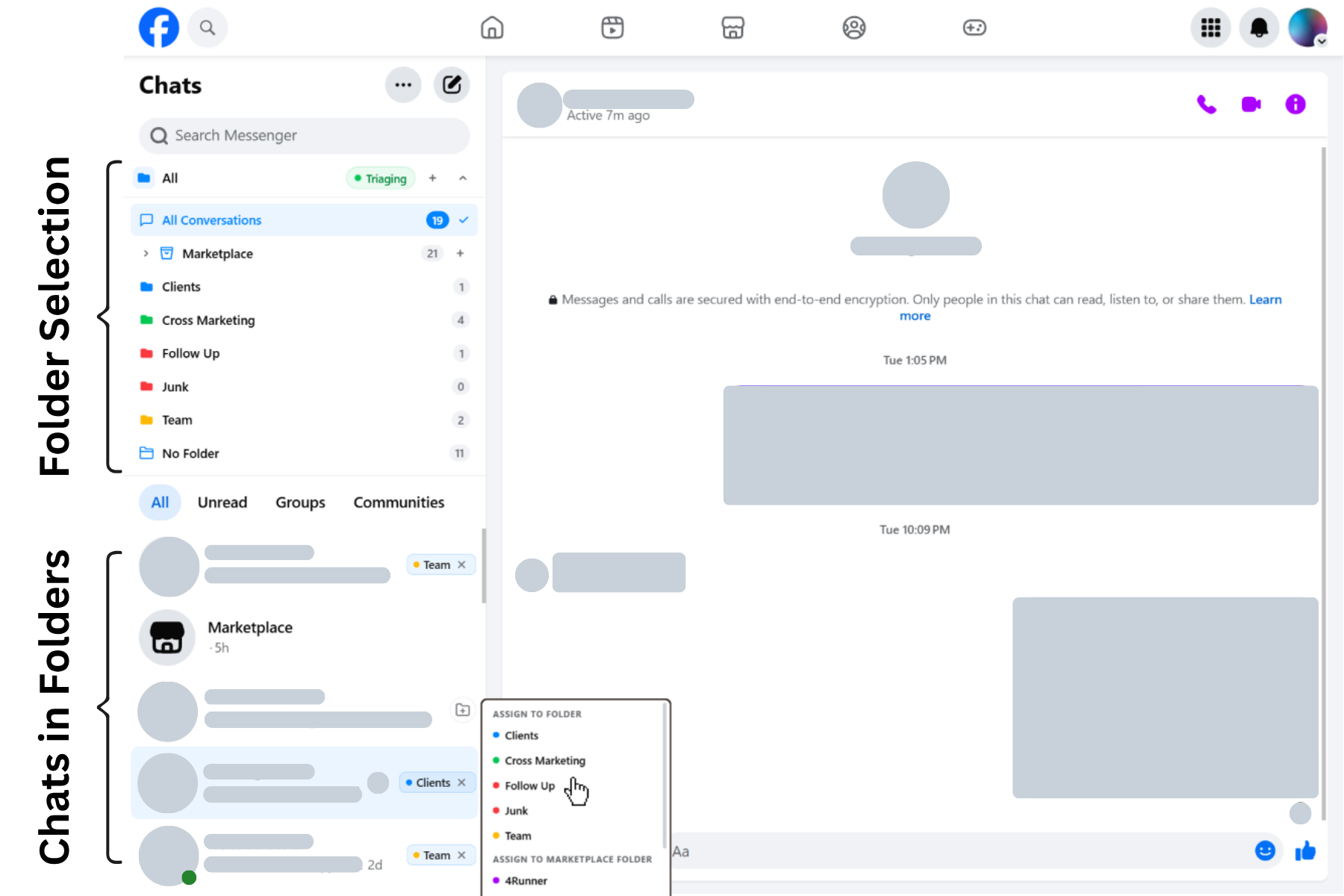
Clean folder tabs mount seamlessly into each platform’s sidebar without breaking original layout or scrolling.
Message Folders Preview
Facebook Messenger with custom folders and conversation tagging
Exclusive Feature

Special Facebook Marketplace Folder Designations

Buying or selling on Facebook? Marketplace conversations get out of hand quickly. Message Folders automatically detects and re-anchors to your Facebook Marketplace subviews, letting you designate folders specifically for items, buyers, and inquiries.

Upgrade for Unlimited Marketplace Folders
Designed for Everyday Productivity

Everything You Need to Master Your Inbox

Built specifically for coaches, creators, sales professionals, and everyday community managers who rely on social DMs.

Custom Color-Coded Folders

Create unlimited folders on paid plans (or up to 3 folders on free). Choose custom names and colors to instantly identify leads, clients, friends, or follow-ups.

One-Click Tagging

Quick "+ Folder" buttons appear on unassigned conversations. Click once to assign or switch folders from a lightweight dropdown menu.

Facebook Marketplace Folders

Special folder designations tailored for Marketplace conversations. Never let an inquiry get lost among your friends' chats.

Real-Time Tallies & Smart Triaging

The folder panel keeps a running count of conversations in each folder and intelligently covers unrelated chats when filtering.

Collapsible & Native-Friendly

Starts collapsed on page load so your native conversations load smoothly, auto-collapses on selection, and preserves native infinite scroll.

100% Client-Side Privacy

Your message contents are never sent to any external server. Folder structures and thread mappings stay securely inside your browser's local storage.

Multi-Platform Ready

One Extension. Four Major Platforms.

Manage all your social conversations with a unified, intuitive folder system.

Facebook Messenger

Full support for messenger.com and facebook.com/messages, plus automatic Marketplace view adaptation.

Marketplace Enabled

Instagram Direct

Seamlessly organizes your web direct messages so creators and influencers never miss important sponsor DMs.

Web DMs Supported

LinkedIn Messaging

Group recruiter messages, client leads, and networking contacts cleanly in LinkedIn's native messaging sidebar.

B2B & Sales Outreach

Skool Chats

Integrates directly into Skool's top chats dropdown so community owners can organize student and client messages.

Community Friendly
Simple, Transparent Pricing

Choose the Plan That Fits Your Workflow

Start completely free on one platform, or upgrade to Pro to unlock all platforms and unlimited folders.

Free

Essential organization to test the waters on your primary messaging channel.

$ 0 / forever
  • 1 Platform of your choice
  • Up to 3 custom folders
  • Conversation tagging & badges
  • Breadcrumb folder filtering
  • Multi-platform simultaneous use
  • Facebook Marketplace designations
Install Free Extension

Pro Monthly

Flexible month-to-month access for active social communicators.

$ 7 / month
  • All 4 Platforms: Facebook, Instagram, LinkedIn & Skool
  • Unlimited custom folders
  • Facebook Marketplace folder designations
  • Smart triaging & count tallies
  • Cancel or pause anytime
Get Pro Monthly

Lifetime Access

One-time payment for lifetime peace of mind and unlimited updates.

$ 150 one-time payment
  • All 4 Platforms + Future Additions
  • Unlimited custom folders forever
  • Facebook Marketplace specialized folders
  • Never pay recurring subscription fees
  • Lifetime license & VIP priority support
Get Lifetime Access

Plan Feature Comparison

Feature Free Plan Pro Plans ($7/mo or $60/yr) Lifetime ($150)
Platform Access 1 Platform Facebook, Instagram, LinkedIn, Skool All 4 + Future Platforms
Folder Limit Up to 3 Folders Unlimited Unlimited
Facebook Marketplace Folder Support — Included Included
Smart Triaging & DOM Cover Barrier
Folder Backup (JSON Export / Import)
Billing Model Free Forever Monthly or Annual Subscription One-Time Payment
Frequently Asked Questions

Got Questions? We Have Answers.

What platforms does Message Folders work on?
Message Folders currently supports Facebook Messenger (both messenger.com and facebook.com/messages), Facebook Marketplace conversations, Instagram Web Direct Messages, LinkedIn Messaging, and Skool Chats.
How does the Free plan work?
The Free plan allows you to organize conversations on any single platform of your choice with up to 3 custom folders. It's completely free forever with no credit card required. If you need more folders or wish to use it across Facebook, Instagram, LinkedIn, and Skool, you can upgrade to Pro anytime.
How does the special Facebook Marketplace feature work?
When you switch into Marketplace conversations on Facebook, Message Folders detects the view change and re-anchors the folder panel to allow dedicated Marketplace folder designations. You can keep your marketplace inquiries, active sales, and customer leads completely categorized and separate from your personal chats.
Are my private messages safe? Does Message Folders read them?
Yes, your messages are 100% private and safe. Message Folders runs strictly inside your local browser. It only maps conversation IDs to your folder labels in your local Chrome extension storage. Your message texts, contacts, and personal data are never sent to our servers.
How do payments and the Lifetime license work?
Payments are securely processed via ExtensionPay and Stripe. You can upgrade directly from the extension popup with one click. If you purchase the $150 Lifetime plan, you pay once and enjoy unlimited folders and platform access forever without recurring monthly or yearly fees.
Can I transfer or back up my folder settings?
Yes! Inside the extension popup, you can easily export your folders and assignments as a JSON file, or restore them on another computer with a single click.

Ready for an Organized Inbox?

Join professionals, creators, and sellers who save hours each week with custom message folders.

× Screenshot Enlargement
Pro Annual • $60/yr

Unlock Pro Annual

Get started in 2 quick steps to activate your plan in your browser:

1

Install Message Folders (Free)

Add the extension to Chrome with one click from the official Chrome Web Store.

2

Click Upgrade in the Extension

Open Message Folders from your Chrome toolbar and select Upgrade. Pro features unlock instantly on your browser!

Add to Chrome to Get Started

Already installed? Click the Message Folders icon in Chrome to upgrade or log in.